Dowload Lastest Books On Hadoop

Amazon Best Deal !!

Powered by Blogger.

Sunday, January 29, 2017

Travel Data Analysis Using spark (use case)


Travel Data Analysis Using spark (use case)

In this blog, we will discuss the analysis of travel dataset and gain insights from the dataset using Apache Spark.
The travel dataset is publically available and the contents are detailed under the heading, ‘Travel Sector Dataset Description’.
Based on the data, we will find the top 20 destination people travel the most, top 20 locations from where people travel the most, top 20 cities that generate high airline revenues for travel, based on booked trip count.

Travel Sector Dataset Description:-


Column 1: City pair (Combination of from and to): String

Column 2: From location: String

Column 3: To Location: String

Column 4: Product type: Integer (1=Air, 2=Car, 3 =Air+Car, 4 =Hotel, 5=Air+Hotel, 6=Hotel +Car, 7 =Air+Hotel+Car)

Column 5: Adults traveling: Integer

Column 6: Seniors traveling: Integer

Column 7: Children traveling: Integer

Column 8: Youth traveling: Integer
Column 9: Infant traveling: Integer

Column 10: Date of travel: String

Column 11: Time of travel: String

Column 12: Date of Return: String

Column 13: Time of Return: String

Column 14: Price of booking: Float

Column 15: Hotel name: String


You can download the dataset from the link below:-


Problem Statement 1:-


Top 20 destination people travel the most: Based on the given data, we can find the most popular destination that people travel frequently. There are many destinations out of which we will find only first 20, based on trips booked for particular destinations.


Source Code:-


val textFile = sc.textFile("hdfs://localhost:9000/TravelData.txt")

val split = textFile.map(lines=>lines.split('\t')).map(x=>(x(2),1)).reduceByKey(_+_).map(item => item.swap).sortByKey(false).take(20)


Description of the above code:-

Line 1: We are creating an RDD by loading a new dataset which is in HDFS.
Line 2: We have split each record by taking the delimiter as tab because the data is tab separated. We are creating the key-value pair, where a key is a destination that is in 3rd column and the value is 1. Since we need to count the cities which are popular, we are using the reduceByKey method to count them. After counting the destinations, we are swapping the key-value pairs. The sortByKey method sorts the data with keys and false stands for descending order. Once the sorting is complete, we are considering the top 20 destinations.

Output
(396,MIA), (290,SFO), (202,LAS), (162,LAX), (102,DFW), (64,DEN), (57,ORD), (54,PHL), (50,IAH), (45,JFK), (44,PHX), (40,FLL), (36,ATL), (31,BOS), (31,MCO), (27,SAN), (25,WAS), (24,CUN), (22,AUS), (22,LON)


You can see the same in the below screen shot.

Problem Statement 2:-


Top 20 locations from where people travel the most: We can find the places from where most of the trips are undertaken, based on the booked trip count.

Source Code:-


val textFile = sc.textFile("hdfs://localhost:9000/TravelData.txt")

val split = textFile.map(lines=>lines.split('\t')).map(x=>(x(1),1)).reduceByKey(_+_).map(item => item.swap).sortByKey(false).take(20)


Description of the above code:-


Line 1: We are creating an RDD by loading a new dataset which is in HDFS.
Line 2: We have split each record by taking the delimiter as tab since the data is tab separated. We are creating the key-value pair, where a key is a location from where people start, that is in the 2nd column and the value is 1. Since we need to count the cities which are popular locations from where people undertake the trips, we are using the reduceByKey method to count them. After counting the locations, we are swapping the key-value pairs. We are using the sortByKey method which sorts the data with keys where false stands for descending order. Once the sorting is complete, we are taking the top 20 locations from where people undertake the trips.


Output:-
(504,DFW), (293,MIA), (272,LAS), (167,BOM), (131,SFO), (101,ORD), (72,LAX), (55,DEN), (41,PHL), (37,IAH), (35,FLL), (33,PHX), (31,JFK), (24,WAS), (19,HOU), (19,ATL), (18,DXB), (17,SAN), (17,BOS), (17,BCN)

You can see the same in the below screen shot


Problem Statement 3:-


Top 20 cities that generate high airline revenues for travel, so that the site can concentrate on offering the discount on booking, to those cities to attract more bookings.

Source Code:-

val textFile = sc.textFile("hdfs://localhost:9000/TravelData.txt")

val fil = textFile.map(x=>x.split('\t')).filter(x=>{if((x(3).matches(("1")))) true else false })

val cnt = fil.map(x=>(x(2),1)).reduceByKey(_+_).map(item => item.swap).sortByKey(false).take(20)


Description of the above code:-


Line 1: We are creating an RDD by loading a new dataset which is in HDFS.
Line 2: We are splitting each record based on the delimiter tab as the data is tab separated. From this, we are filtering the records based on the mode of travel. Here, we need the count of people who traveled by flight which is denoted by 1 (1=Air, 2=Car, 3 =Air+Car, 4 =Hotel, 5=Air+Hotel, 6=Hotel +Car, 7 =Air+Hotel+Car).
Line 3: We are creating the key-value pairs for those people who traveled by air, where the key is the destinations which are in 3rd column and value is 1. Since we need to count the popular cities, we are counting them by using the reduceByKey method. After counting the destinations, we are swapping the key-value pairs. We are using the sortByKey method to sort the data with keys where false stands for descending order. Once sorting is completed, we are considering top 20 cities that generate high airline revenues for travel.


Output:
(84,MIA), (68,SFO), (54,LAS), (42,LAX), (24,IAH), (23,DFW), (18,PHX), (17,BOS), (15,ORD), (13,NYC), (9,DCA), (8,WAS), (8,AUS), (7,DEN), (7,MEM), (7,JFK), (6,SYD), (6,PHL), (6,ATL), (5,RIC)


You can see the same in the below screen shot.

We hope this blog was useful. Keep visiting my blog https://hadoopbigdata123.blogspot.in/  for more updates on BigData and other technologies.


Sunday, January 1, 2017

Introduction To Apache Flume


Introduction To Apache Flume


What is Flume?
Apache Flume is a tool/service/data ingestion mechanism for collecting aggregating and transporting large amounts of streaming data such as log files, events (etc...) from various sources to a centralized data store.
Flume is a highly reliable, distributed, and configurable tool. It is principally designed to copy streaming data (log data) from various web servers to HDFS.

Assume an e-commerce web application wants to analyze the customer behavior from a particular region. To do so, they would need to move the available log data into Hadoop for analysis. Here, Apache Flume comes to our rescue.
Flume is used to move the log data generated by application servers into HDFS at a higher speed.
Advantages of Flume:-
·       Using Apache Flume we can store the data into any of the centralized stores (HBase, HDFS).
·        When the rate of incoming data exceeds the rate at which data can be written to the destination, Flume acts as a mediator between data producers and the centralized stores and provides a steady flow of data between them.
·        Flume provides the feature of contextual routing.
·        The transactions in Flume are channel-based where two transactions (one sender and one receiver) are maintained for each message. It guarantees reliable message delivery.
·  Flume is reliable, fault tolerant, scalable, manageable, and customizable.
Features of Flume:-
·        Flume ingests log data from multiple web servers into a centralized store (HDFS, HBase) efficiently.
·        Using Flume, we can get the data from multiple servers immediately into Hadoop.
·        Along with the log files, Flume is also used to import huge volumes of event data produced by social networking sites like Facebook and Twitter, and e-commerce websites like Amazon and Flipkart.
·        Flume supports a large set of sources and destinations types.
·  Flume supports multi-hop flows, fan-in fan-out flows, contextual routing, etc.
·        Flume can be scaled horizontally.

Thursday, December 15, 2016

INTRODUCTION TO HIVE


The term ‘Big Data’ is used for collections of large datasets that include huge volume, high velocity, and a variety of data that is increasing day by day. Using traditional data management systems, it is difficult to process Big Data. Therefore, the Apache Software Foundation introduced a framework called Hadoop to solve Big Data management and processing challenges.

Hadoop

Hadoop is an open-source framework to store and process Big Data in a distributed environment. It contains two modules, one is MapReduce and another is Hadoop Distributed File System (HDFS).
  • MapReduce: It is a parallel programming model for processing large amounts of structured, semi-structured, and unstructured data on large clusters of commodity hardware.
  • HDFS:Hadoop Distributed File System is a part of Hadoop framework, used to store and process the datasets. It provides a fault-tolerant file system to run on commodity hardware.
The Hadoop ecosystem contains different sub-projects (tools) such as Sqoop, Pig, and Hive that are used to help Hadoop modules.
  • Sqoop: It is used to import and export data to and from between HDFS and RDBMS.
  • Pig: It is a procedural language platform used to develop a script for MapReduce operations.
  • Hive: It is a platform used to develop SQL type scripts to do MapReduce operations.
Note: There are various ways to execute MapReduce operations:
  • The traditional approach using Java MapReduce program for structured, semi-structured, and unstructured data.
  • The scripting approach for MapReduce to process structured and semi structured data using Pig.
  • The Hive Query Language (HiveQL or HQL) for MapReduce to process structured data using Hive.

What is Hive

Hive is a data warehouse infrastructure tool to process structured data in Hadoop. It resides on top of Hadoop to summarize Big Data, and makes querying and analyzing easy.
Initially Hive was developed by Facebook, later the Apache Software Foundation took it up and developed it further as an open source under the name Apache Hive. It is used by different companies. For example, Amazon uses it in Amazon Elastic MapReduce.

Hive is not

  • A relational database
  • A design for OnLine Transaction Processing (OLTP)
  • A language for real-time queries and row-level updates

Features of Hive

  • It stores schema in a database and processed data into HDFS.
  • It is designed for OLAP.
  • It provides SQL type language for querying called HiveQL or HQL.
  • It is familiar, fast, scalable, and extensible.

Architecture of Hive

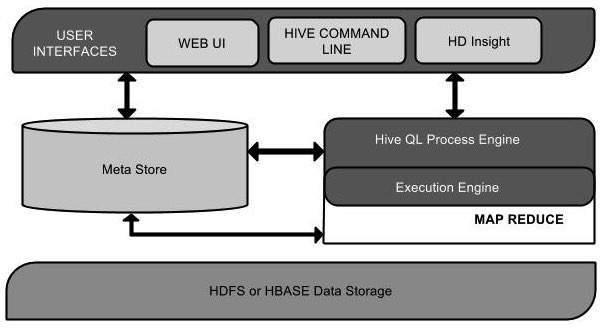
The following component diagram depicts the architecture of Hive:
Hive Architecture
This component diagram contains different units. The following table describes each unit:
Unit NameOperation
User InterfaceHive is a data warehouse infrastructure software that can create interaction between user and HDFS. The user interfaces that Hive supports are Hive Web UI, Hive command line, and Hive HD Insight (In Windows server).
Meta StoreHive chooses respective database servers to store the schema or Metadata of tables, databases, columns in a table, their data types, and HDFS mapping.
HiveQL Process EngineHiveQL is similar to SQL for querying on schema info on the Metastore. It is one of the replacements of traditional approach for MapReduce program. Instead of writing MapReduce program in Java, we can write a query for MapReduce job and process it.
Execution EngineThe conjunction part of HiveQL process Engine and MapReduce is Hive Execution Engine. Execution engine processes the query and generates results as same as MapReduce results. It uses the flavor of MapReduce.
HDFS or HBASEHadoop distributed file system or HBASE are the data storage techniques to store data into file system.

Working of Hive

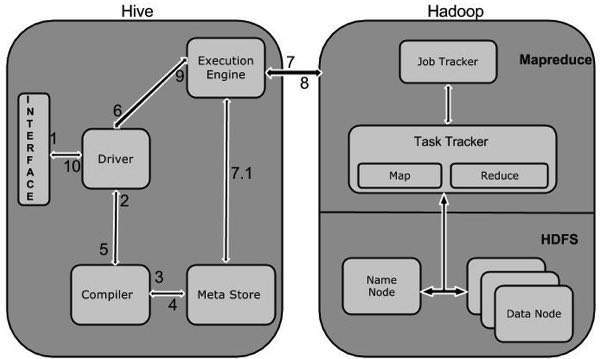
The following diagram depicts the workflow between Hive and Hadoop.
How Hive Works
The following table defines how Hive interacts with Hadoop framework:
Step No.Operation
1Execute Query
The Hive interface such as Command Line or Web UI sends query to Driver (any database driver such as JDBC, ODBC, etc.) to execute.
2Get Plan
The driver takes the help of query compiler that parses the query to check the syntax and query plan or the requirement of query.
3Get Metadata
The compiler sends metadata request to Metastore (any database).
4Send Metadata
Metastore sends metadata as a response to the compiler.
5Send Plan
The compiler checks the requirement and resends the plan to the driver. Up to here, the parsing and compiling of a query is complete.
6Execute Plan
The driver sends the execute plan to the execution engine.
7Execute Job
Internally, the process of execution job is a MapReduce job. The execution engine sends the job to JobTracker, which is in Name node and it assigns this job to TaskTracker, which is in Data node. Here, the query executes MapReduce job.
7.1Metadata Ops
Meanwhile in execution, the execution engine can execute metadata operations with Metastore.
8Fetch Result
The execution engine receives the results from Data nodes.
9Send Results
The execution engine sends those resultant values to the driver.
10Send Results
The driver sends the results to Hive Interfaces.

Sunday, December 4, 2016

INTRODUCTION TO APACHE PIG IN HADOOP


What is Apache Pig?

Apache Pig is an abstraction over MapReduce. It is a tool/platform which is used to analyze larger sets of data representing them as data flows. Pig is generally used with Hadoop; we can perform all the data manipulation operations in Hadoop using Apache Pig.

To write data analysis programs, Pig provides a high-level language known as Pig Latin. This language provides various operators using which programmers can develop their own functions for reading, writing, and processing data.

To analyze data using Apache Pig, programmers need to write scripts using Pig Latin language. All these scripts are internally converted to Map and Reduce tasks. Apache Pig has a component known as Pig Engine that accepts the Pig Latin scripts as input and converts those scripts into MapReduce jobs.

Why Do We Need Apache Pig?

Programmers who are not so good at Java normally used to struggle working with Hadoop, especially while performing any MapReduce tasks. Apache Pig is a boon for all such programmers.

Using Pig Latin, programmers can perform MapReduce tasks easily without having to type complex codes in Java.

Apache Pig uses multi-query approach, thereby reducing the length of codes. For example, an operation that would require you to type 200 lines of code (LoC) in Java can be easily done by typing as less as just 10 LoC in Apache Pig. Ultimately Apache Pig reduces the development time by almost 16 times.

Pig Latin is SQL-like language and it is easy to learn Apache Pig when you are familiar with SQL.

Apache Pig provides many built-in operators to support data operations like joins, filters, ordering, etc. In addition, it also provides nested data types like tuples, bags, and maps that are missing from MapReduce.

Features of Pig:-

Apache Pig comes with the following features −

Rich set of operators − It provides many operators to perform operations like join, sort, filer, etc.

Ease of programming − Pig Latin is similar to SQL and it is easy to write a Pig script if you are good at SQL.

Optimization opportunities − The tasks in Apache Pig optimize their execution automatically, so the programmers need to focus only on semantics of the language.

Extensibility − Using the existing operators, users can develop their own functions to read, process, and write data.

UDF’s − Pig provides the facility to create User-defined Functions in other programming languages such as Java and invoke or embed them in Pig Scripts.

Handles all kinds of data − Apache Pig analyzes all kinds of data, both structured as well as unstructured. It stores the results in HDFS.

Apache Pig Vs MapReduce:-


  • Listed below are the major differences between Apache Pig and MapReduce.
  • Apache Pig is a data flow language. MapReduce is a data processing paradigm.
  • It is a high level language.MapReduce is low level and rigid.
  • Performing a Join operation in Apache Pig is pretty simple. It is quite difficult in MapReduce to perform a Join operation between datasets.
  • Any novice programmer with a basic knowledge of SQL can work conveniently with Apache Pig. Exposure to Java is must to work with MapReduce.
  • Apache Pig uses multi-query approach, thereby reducing the length of the codes to a great extent. MapReduce will require almost 20 times more the number of lines to perform the same task.
  • There is no need for compilation. On execution, every Apache Pig operator is converted internally into a MapReduce job. MapReduce jobs have a long compilation process.

Apache Pig Vs SQL:-

  • Listed below are the major differences between Apache Pig and SQL.
  • Pig Latin is a procedural language. SQL is a declarative language.
  • In Apache Pig, schema is optional. We can store data without designing a schema (values are stored as $01, $02 etc.) Schema is mandatory in SQL.
  • The data model in Apache Pig is nested relational.The data model used in SQL is flat relational.
  • Apache Pig provides limited opportunity for Query optimization.There is more opportunity for query optimization in SQL.


In addition to above differences, Apache Pig Latin :-


  • Allows splits in the pipeline.
  • Allows developers to store data anywhere in the pipeline.
  • Declares execution plans.
  • Provides operators to perform ETL (Extract, Transform, and Load) functions.
  • Apache Pig Vs Hive
  • Both Apache Pig and Hive are used to create MapReduce jobs. And in some cases, Hive operates on HDFS in a similar way Apache Pig does. In the following table, we have listed a few significant points that set Apache Pig apart from Hive.


Apache Pig  Vs Hive:-


  • Apache Pig uses a language called Pig Latin. It was originally created at Yahoo. Hive uses a language called HiveQL. It was originally created at Facebook.
  • Pig Latin is a data flow language. HiveQL is a query processing language.
  • Pig Latin is a procedural language and it fits in pipeline paradigm. HiveQL is a declarative language.
  • Apache Pig can handle structured, unstructured, and semi-structured data. Hive is mostly for structured data.
  • Apache Pig is generally used by data scientists for performing tasks involving ad-hoc processing and quick prototyping. Apache Pig is used −


  • To process huge data sources such as web logs.
  • To perform data processing for search platforms.
  • To process time sensitive data loads.

Sunday, November 27, 2016

Hadoop - HDFS Overview


                             Hadoop - HDFS Overview  


Hadoop File System was developed using distributed file system design. It is run on 
commodity hardware. Unlike other distributed systems, HDFS is highly fault tolerant and designed using low-cost hardware.

HDFS holds very large amount of data and provides easier access. To store such huge data, the files are stored across multiple machines. These files are stored in redundant fashion to rescue the system from possible data losses in case of failure. HDFS also makes applications available to parallel processing.

Features of HDFS
It is suitable for the distributed storage and processing.
Hadoop provides a command interface to interact with HDFS.
The built-in servers of name node and data node help users to easily check the status of cluster.
Streaming access to file system data.
HDFS provides file permissions and authentication.

HDFS Architecture:-

Given below is the architecture of a Hadoop File System.


HDFS follows the master-slave architecture and it has the following elements.

Namenode:-

The namenode is the commodity hardware that contains the GNU/Linux operating system and the namenode software. It is a software that can be run on commodity hardware. The system having the namenode acts as the master server and it does the following tasks:

Manages the file system namespace.
Regulates client’s access to files.
It also executes file system operations such as renaming, closing, and opening files and directories.

Datanode:-

The datanode is a commodity hardware having the GNU/Linux operating system and datanode software. For every node (Commodity hardware/System) in a cluster, there will be a datanode. These nodes manage the data storage of their system.

Datanodes perform read-write operations on the file systems, as per client request.
They also perform operations such as block creation, deletion, and replication according to the instructions of the namenode.
Block
Generally the user data is stored in the files of HDFS. The file in a file system will be divided into one or more segments and/or stored in individual data nodes. These file segments are called as blocks. In other words, the minimum amount of data that HDFS can read or write is called a Block. The default block size is 64MB, but it can be increased as per the need to change in HDFS configuration.

Goals of HDFS:-

Fault detection and recovery : Since HDFS includes a large number of commodity hardware, failure of components is frequent. Therefore HDFS should have mechanisms for quick and automatic fault detection and recovery.

Huge datasets : HDFS should have hundreds of nodes per cluster to manage the applications having huge datasets.

Hardware at data : A requested task can be done efficiently, when the computation takes place near the data. Especially where huge datasets are involved, it reduces the network traffic and increases the throughput.

HDFS Video :-


Sunday, November 20, 2016

Introduction to Big Data Hadoop


 Introduction to Big Data Hadoop :-

Hadoop Architecture

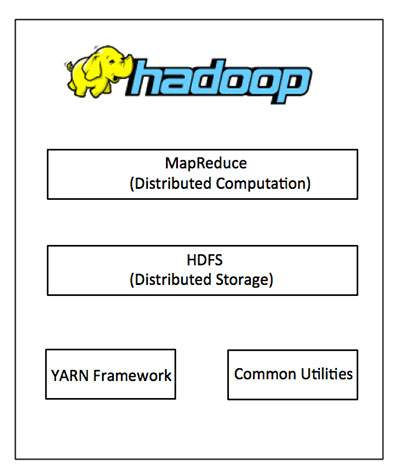
Hadoop framework includes following four modules:
Hadoop Common: These are Java libraries and utilities required by other Hadoop modules. These libraries provides filesystem and OS level abstractions and contains the necessary Java files and scripts required to start Hadoop.
  • Hadoop YARN: This is a framework for job scheduling and cluster resource management.
  • Hadoop Distributed File System (HDFS™): A distributed file system that provides high-throughput access to application data.
  • Hadoop MapReduce: This is YARN-based system for parallel processing of large data sets.
We can use the following diagram to depict these four components available in Hadoop framework.
Hadoop Architecture
Since 2012, the term "Hadoop" often refers not just to the base modules mentioned above but also to the collection of additional software packages that can be installed on top of or alongside Hadoop, such as Apache Pig, Apache Hive, Apache HBase, Apache Spark etc.

MapReduce

Hadoop MapReduce is a software framework for easily writing applications which process big amounts of data in-parallel on large clusters (thousands of nodes) of commodity hardware in a reliable, fault-tolerant manner.
The term MapReduce actually refers to the following two different tasks that Hadoop programs perform:
  • The Map Task: This is the first task, which takes input data and converts it into a set of data, where individual elements are broken down into tuples (key/value pairs).
  • The Reduce Task: This task takes the output from a map task as input and combines those data tuples into a smaller set of tuples. The reduce task is always performed after the map task.
Typically both the input and the output are stored in a file-system. The framework takes care of scheduling tasks, monitoring them and re-executes the failed tasks.
The MapReduce framework consists of a single master JobTracker and one slave TaskTracker per cluster node. The master is responsible for resource management, tracking resource consumption/availability and scheduling the jobs component tasks on the slaves, monitoring them and re-executing the failed tasks. The slaves TaskTracker execute the tasks as directed by the master and provide task-status information to the master periodically.
The JobTracker is a single point of failure for the Hadoop MapReduce service which means if JobTracker goes down, all running jobs are halted.

How Does Hadoop Work?

Stage 1

A user/application can submit a job to the Hadoop (a hadoop job client) for required process by specifying the following items:
  1. The location of the input and output files in the distributed file system.
  2. The java classes in the form of jar file containing the implementation of map and reduce functions.